Design System
Establishing design consistency and efficiency at scale
Role
Product Design
/
Company
Vividly
/
Industry
Enterprise Financial Analytics
/
Duration
Ongoing
/
Year
2023
Overview
(00)
Users struggled to learn Vividly's fast-moving product—inconsistent patterns meant they relearned features in different sections. Filters worked differently in Budget versus Reports. Tables had different interaction patterns. Support tickets from confused customers piled up, and UI bugs compounded as the team moved quickly without design infrastructure.
I built a design system without dedicated resources, using incremental improvements to address the highest-impact problems. Support tickets and UI bugs dropped 30%, and the team adopted 46,855+ component instances in the first year.
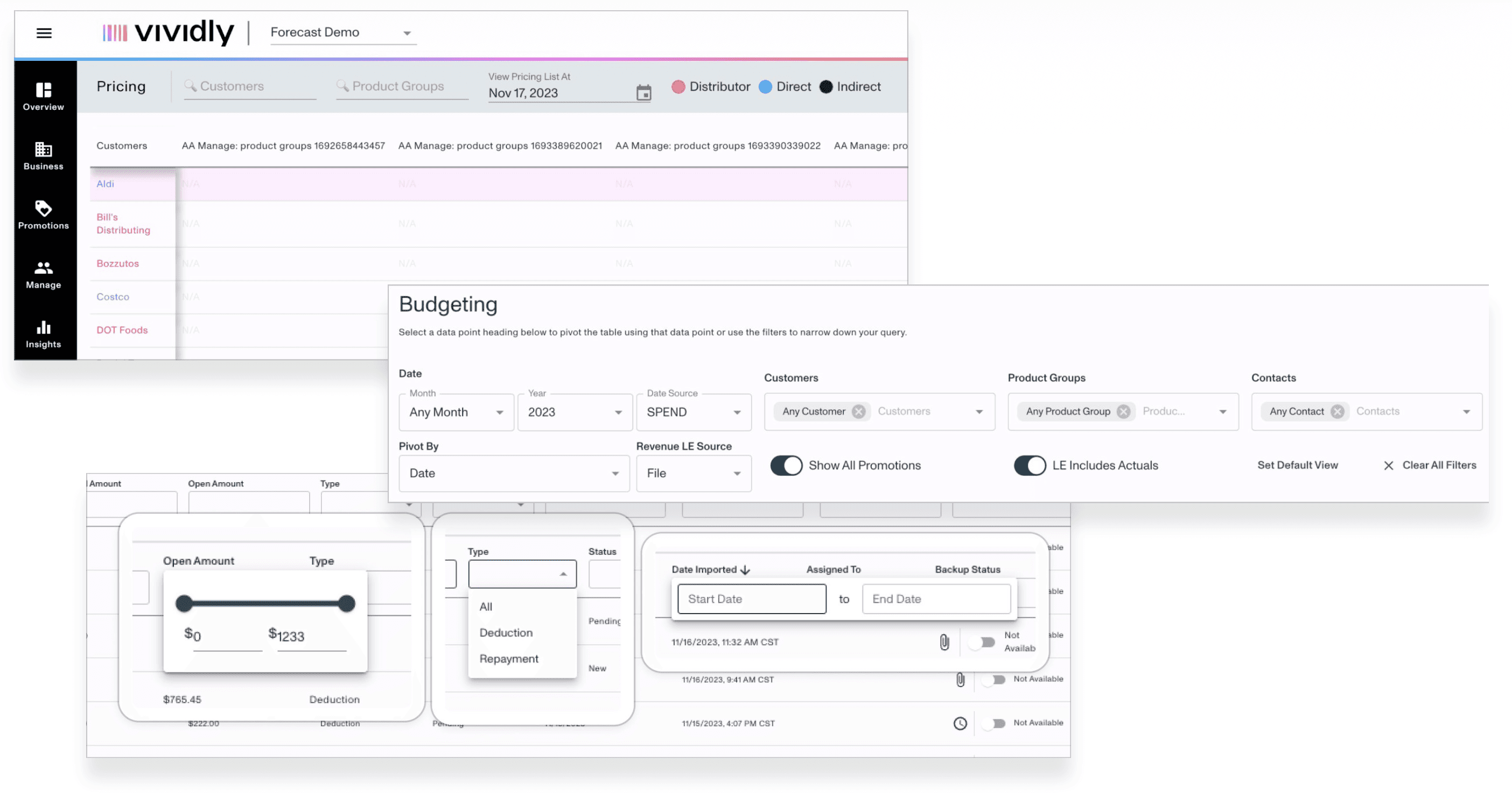
Early component audit.
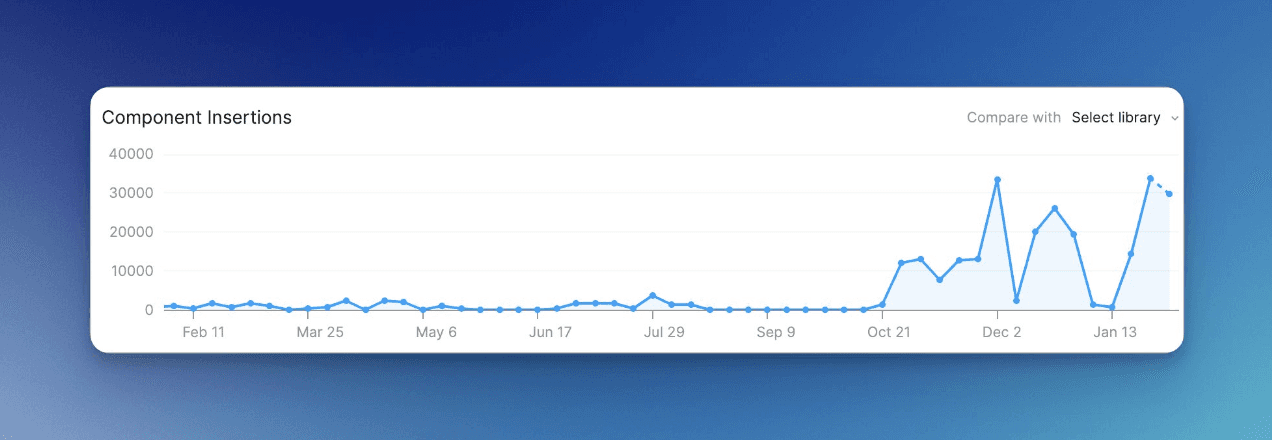
Component library usage was minimal prior to launching Prism (Vividly Design System)
My Approach
(01)
I advocated for design system work when leadership didn't prioritize it. Without dedicated resources or bandwidth for comprehensive system-building, I chose a pragmatic strategy: target high-impact components (tables, filters) that could propagate across features and address both user confusion and designer-engineer handoff friction.
I facilitated cross-functional collaboration through a design system guild and treated the system as continuously refined based on product evolution. This living system approach made it sustainable without dedicated resources and kept it aligned with real product needs rather than enforcing rigid rules.
What We Built
(02)
Component Library
Built and documented 1,500+ components in Figma organized by user needs: navigation, forms, data display, feedback, and layout. These components enabled 46,855+ instances across product files in the first year (~3,900 monthly), showing rapid team adoption.
Documentation & Governance
Centralized documentation in Notion with contribution guidelines for designers and engineers. Created a design system guild for cross-functional collaboration and established a token system for colors, typography, and spacing.
Design Principles
Established core principles to guide product decisions:
Accessibility-first: Ensure inclusive experiences through WCAG compliance
Efficient workflows: Reduce cognitive load for complex financial operations
Consistent patterns: Users learn once, apply everywhere
Scalable architecture: Support growing feature complexity
Adoption Strartegy
Refactored existing components to establish baseline patterns, provided training and support for design system usage, and monitored implementation across product teams with iterative refinement based on feedback.
2023 Iterative Improvements
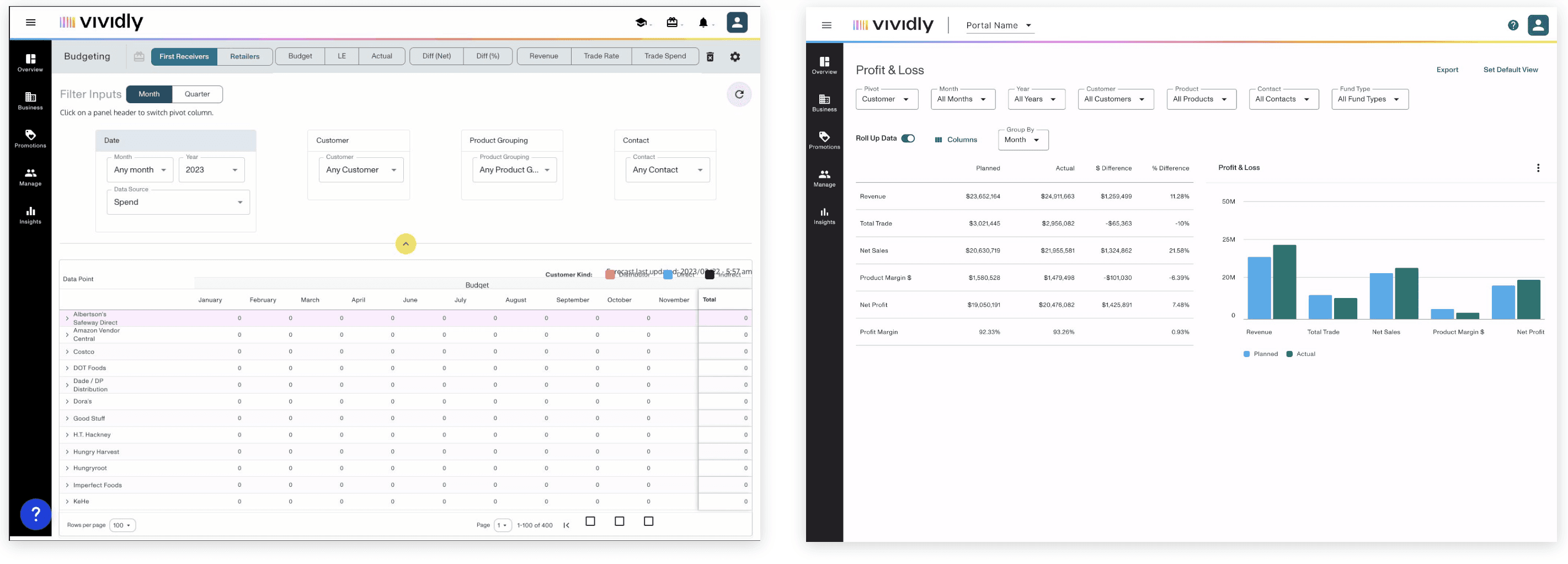
Without bandwidth for comprehensive updates, I focused on high-impact components (e.g. tables and filters) that could propagate across features. This approach built momentum. Addressing core patterns in isolation enabled their eventual implementation into larger features like Budget, delivering value iteratively without requiring massive upfront investment.
2024-2025 Major Enhancements
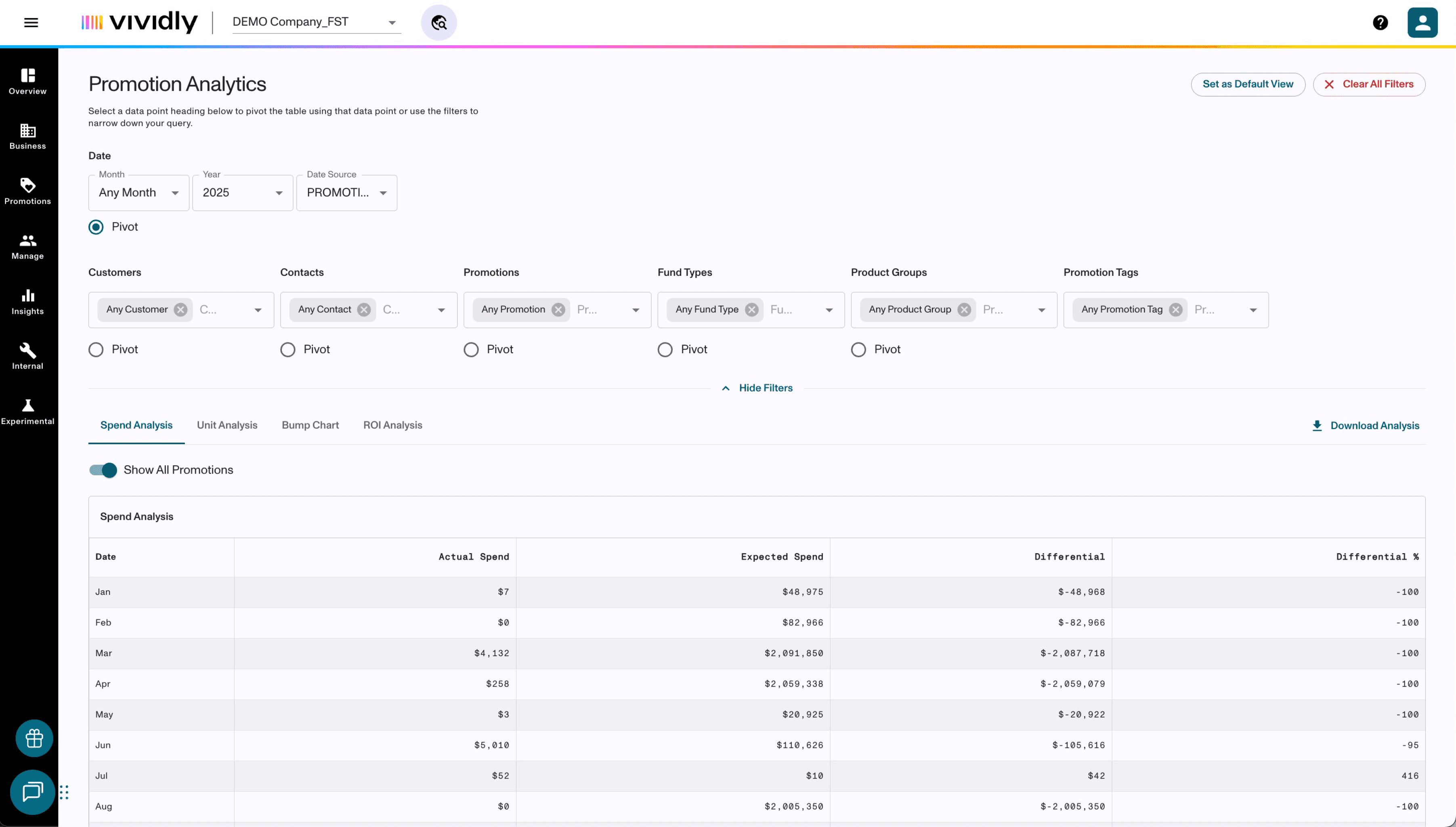
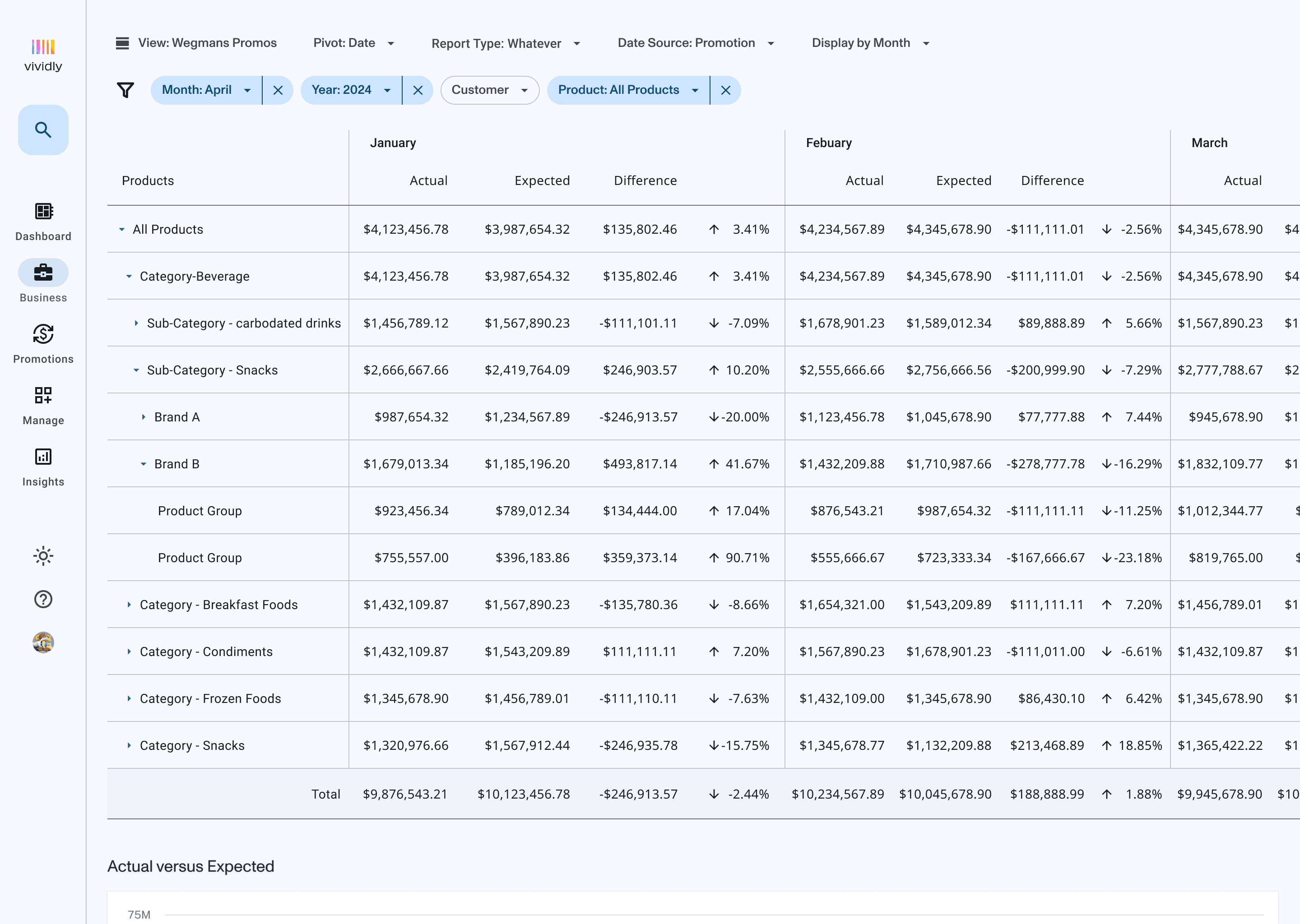
Scaled consistent patterns platform-wide, introducing larger changes gradually to avoid disrupting users. Filter improvements addressed long-standing pain points in how users refined data across features. Layout and style overhauls brought visual consistency across the product, reinforcing the patterns established in 2023.
Filter Improvements


Layout and Style Overhauls
Before
After
Impact
(03)
The system established a foundation for multi-product expansion and created a collaboration framework that enabled onboarding new team members with consistent documentation and patterns.
User Experience
Support tickets and UI bugs related to feature confusion dropped 30%
Consistent interactions reduced learning curve—users transferred knowledge from one feature to another
Pattern reuse improved reliability across the platform
Team Efficiency
46,855+ component instances adopted in first year (~3,900 monthly), showing rapid team buy-in
Reduced design redundancy across product files
Enabled faster feature development with reusable patterns
Collaboration
Created collaboration framework between design and engineering
Documentation enabled onboarding of new team members
Improved designer-engineer handoffs through shared language and components
"One thing that's always been an issue is that the elements in Figma don't necessarily correlate to our design system. I noticed with your Auto Assign mockups, they have been. So if that's something you are doing good job lol
Before it was hard for me to tell if, a header was an h4, h5, a caption etc. Your designs tend to have that when I focus on individual elements, which helps me choose what components to use"
—Engineering Lead
Reflections
(04)
Building a design system at a startup requires balancing documentation with momentum. I prioritized documenting existing patterns first rather than designing ideal-state components, which enabled faster adoption and iteration based on real product needs. Treating it as a living system—continuously refined based on product evolution rather than enforcing rigid rules—made it sustainable without dedicated resources.
Design System
Establishing design consistency and efficiency at scale
Role
Product Design
/
Company
Vividly
/
Industry
Enterprise Financial Analytics
/
Duration
Ongoing
/
Year
2023
Overview
(00)
Users struggled to learn Vividly's fast-moving product—inconsistent patterns meant they relearned features in different sections. Filters worked differently in Budget versus Reports. Tables had different interaction patterns. Support tickets from confused customers piled up, and UI bugs compounded as the team moved quickly without design infrastructure.
I built a design system without dedicated resources, using incremental improvements to address the highest-impact problems. Support tickets and UI bugs dropped 30%, and the team adopted 46,855+ component instances in the first year.
Early component audit.
Component library usage was minimal prior to launching Prism (Vividly Design System)
My Approach
(01)
I advocated for design system work when leadership didn't prioritize it. Without dedicated resources or bandwidth for comprehensive system-building, I chose a pragmatic strategy: target high-impact components (tables, filters) that could propagate across features and address both user confusion and designer-engineer handoff friction.
I facilitated cross-functional collaboration through a design system guild and treated the system as continuously refined based on product evolution. This living system approach made it sustainable without dedicated resources and kept it aligned with real product needs rather than enforcing rigid rules.
What We Built
(02)
Component Library
Built and documented 1,500+ components in Figma organized by user needs: navigation, forms, data display, feedback, and layout. These components enabled 46,855+ instances across product files in the first year (~3,900 monthly), showing rapid team adoption.
Design Principles
Established core principles to guide product decisions:
Accessibility-first: Ensure inclusive experiences through WCAG compliance
Efficient workflows: Reduce cognitive load for complex financial operations
Consistent patterns: Users learn once, apply everywhere
Scalable architecture: Support growing feature complexity
Documentation & Governance
Centralized documentation in Notion with contribution guidelines for designers and engineers. Created a design system guild for cross-functional collaboration and established a token system for colors, typography, and spacing.
Adoption Strartegy
Refactored existing components to establish baseline patterns, provided training and support for design system usage, and monitored implementation across product teams with iterative refinement based on feedback.
2023 Iterative Improvements
Without bandwidth for comprehensive updates, I focused on high-impact components (e.g. tables and filters) that could propagate across features. This approach built momentum. Addressing core patterns in isolation enabled their eventual implementation into larger features like Budget, delivering value iteratively without requiring massive upfront investment.
2024-2025 Major Enhancements
Scaled consistent patterns platform-wide, introducing larger changes gradually to avoid disrupting users. Filter improvements addressed long-standing pain points in how users refined data across features. Layout and style overhauls brought visual consistency across the product, reinforcing the patterns established in 2023.
Filter Improvements
Layout and Style Overhauls
Before
After
Impact
(03)
User Experience
Support tickets and UI bugs related to feature confusion dropped 30%
Consistent interactions reduced learning curve—users transferred knowledge from one feature to another
Pattern reuse improved reliability across the platform
Team Efficiency
46,855+ component instances adopted in first year (~3,900 monthly), showing rapid team buy-in
Reduced design redundancy across product files
Enabled faster feature development with reusable patterns
Collaboration
Created collaboration framework between design and engineering
Documentation enabled onboarding of new team members
Improved designer-engineer handoffs through shared language and components
"One thing that's always been an issue is that the elements in Figma don't necessarily correlate to our design system. I noticed with your Auto Assign mockups, they have been. So if that's something you are doing good job lol
Before it was hard for me to tell if, a header was an h4, h5, a caption etc. Your designs tend to have that when I focus on individual elements, which helps me choose what components to use"
—Engineering Lead
The system established a foundation for multi-product expansion and created a collaboration framework that enabled onboarding new team members with consistent documentation and patterns.
Reflections
(04)
Building a design system at a startup requires balancing documentation with momentum. I prioritized documenting existing patterns first rather than designing ideal-state components, which enabled faster adoption and iteration based on real product needs. Treating it as a living system—continuously refined based on product evolution rather than enforcing rigid rules—made it sustainable without dedicated resources.
Overview
(00)
Users struggled to learn Vividly's fast-moving product—inconsistent patterns meant they relearned features in different sections. Filters worked differently in Budget versus Reports. Tables had different interaction patterns. Support tickets from confused customers piled up, and UI bugs compounded as the team moved quickly without design infrastructure.
I built a design system without dedicated resources, using incremental improvements to address the highest-impact problems. Support tickets and UI bugs dropped 30%, and the team adopted 46,855+ component instances in the first year.
Early component audit.
Component library usage was minimal prior to launching Prism (Vividly Design System)
My Approach
(01)
I advocated for design system work when leadership didn't prioritize it. Without dedicated resources or bandwidth for comprehensive system-building, I chose a pragmatic strategy: target high-impact components (tables, filters) that could propagate across features and address both user confusion and designer-engineer handoff friction.
I facilitated cross-functional collaboration through a design system guild and treated the system as continuously refined based on product evolution. This living system approach made it sustainable without dedicated resources and kept it aligned with real product needs rather than enforcing rigid rules.
What We Built
(02)
Component Library
Built and documented 1,500+ components in Figma organized by user needs: navigation, forms, data display, feedback, and layout. These components enabled 46,855+ instances across product files in the first year (~3,900 monthly), showing rapid team adoption.
Design Principles
Established core principles to guide product decisions:
Accessibility-first: Ensure inclusive experiences through WCAG compliance
Efficient workflows: Reduce cognitive load for complex financial operations
Consistent patterns: Users learn once, apply everywhere
Scalable architecture: Support growing feature complexity
Documentation & Governance
Centralized documentation in Notion with contribution guidelines for designers and engineers. Created a design system guild for cross-functional collaboration and established a token system for colors, typography, and spacing.
Adoption Strartegy
Refactored existing components to establish baseline patterns, provided training and support for design system usage, and monitored implementation across product teams with iterative refinement based on feedback.
2023 Iterative Improvements
Without bandwidth for comprehensive updates, I focused on high-impact components (e.g. tables and filters) that could propagate across features. This approach built momentum. Addressing core patterns in isolation enabled their eventual implementation into larger features like Budget, delivering value iteratively without requiring massive upfront investment.
2024-2025 Major Enhancements
Scaled consistent patterns platform-wide, introducing larger changes gradually to avoid disrupting users. Filter improvements addressed long-standing pain points in how users refined data across features. Layout and style overhauls brought visual consistency across the product, reinforcing the patterns established in 2023.
Filter Improvements
Layout and Style Overhauls
Before
After
Impact
(03)
User Experience
Support tickets and UI bugs related to feature confusion dropped 30%
Consistent interactions reduced learning curve—users transferred knowledge from one feature to another
Pattern reuse improved reliability across the platform
Team Efficiency
46,855+ component instances adopted in first year (~3,900 monthly), showing rapid team buy-in
Reduced design redundancy across product files
Enabled faster feature development with reusable patterns
Collaboration
Created collaboration framework between design and engineering
Documentation enabled onboarding of new team members
Improved designer-engineer handoffs through shared language and components
"One thing that's always been an issue is that the elements in Figma don't necessarily correlate to our design system. I noticed with your Auto Assign mockups, they have been. So if that's something you are doing good job lol
Before it was hard for me to tell if, a header was an h4, h5, a caption etc. Your designs tend to have that when I focus on individual elements, which helps me choose what components to use"
—Engineering Lead
The system established a foundation for multi-product expansion and created a collaboration framework that enabled onboarding new team members with consistent documentation and patterns.
Reflections
(04)
Building a design system at a startup requires balancing documentation with momentum. I prioritized documenting existing patterns first rather than designing ideal-state components, which enabled faster adoption and iteration based on real product needs. Treating it as a living system—continuously refined based on product evolution rather than enforcing rigid rules—made it sustainable without dedicated resources.
Design System
Establishing design consistency and efficiency at scale
Role
Product Design
Company
Vividly
Industry
Enterprise Financial Analytics
Duration
Ongoing
Year
2023